Tuesday, July 01, 2014

How to Get Start Button in Windows 8

Start_Menu_Windows_8.jpg
The start menu as we knew it since Windows 95, is dead. The start button was removed with the launch of Windows 8 and then brought back with the Windows 8.1 update. But this button was but a shell of the start menu of the past. Clicking the start button in Windows 8.1 merely takes you to the Windows 8 start screen - the one with all those tiles. Microsoft might decide to bring the start menu back in a future update, but why wait when you can restore it right now? Here are our three favourite ways to get the start menu back in Windows 8.
Classic Shell
The simplest method available is to download Classic Shell and install the app. By default, this app will hide the Windows 8.1 start button and boot to desktop without opening the Windows 8 Start screen. So all you have to do is install it and enjoy your classic Windows start menu, with no further steps involved.
However, if you wish to customise the look-and-feel your start menu, Classic Shell has enough options for power users. You can replace the start button icon with any image of your choice, choose how the start menu looks (Windows classic or Windows 7 style), choose which shortcuts open the Modern UI screen, choose icon sizes and even disable or enable active corners (which let you switch to Modern UI). You can see more options for yourself. Just right-click the start button > settings.
If that isn't enough, you can even change how Windows Explorer menus look. If you would rather have Windows show you classic Windows 7 toolbar at the top of every Explorer window you open, head to Start > All Programs > Classic Shell > Classic Explorer Settings. Here check Show all settings and click the Toolbar buttons tab. Now you can add all the buttons you were missing. There are several other appearance tweaks here that let you tweak Windows 8's explorer. If you are hell-bent on getting that Windows classic look, you can take a look at all the options and see what suits your needs.
Classic_Shell.jpg
Pokki
If you don't want Classic Shell's advanced tweaking options and want a different-looking start menu, try Pokki. This app doesn't replace the Windows 8.1 start button, but adds a Pokki icon next to it. To remove the start button, right-click the Pokki icon > deselect the "Show Windows logo" option.
The Pokki menu is also not the classic start menu you would be used to but rather, a modified version that's bigger and better than what you remember. There's a large panel of grey boxes to the right of your usual start menu, and each box can house an app while the left hand side has quick navigation links to favourites, all apps, Control Panel, along with a customisable list of locations such as Libraries, Documents, etc.
To tweak this menu, right-click the Pokki icon > Settings. Make sure you uncheck "Show popular PC apps" to remove the ads at the bottom.
That aside, you can choose the theme, show or hide the left sidebar, choose which quick-links show up in the sidebar, change the Pokki icon to a walnut, home or the Windows logo, etc. There are more than enough customisation options and the layout isn't as intimidating as Classic Shell if you are not used to tweaking.
Pokki_Win8.jpg
Start Menu Reviver 2
In case you want the start menu, but liked the modern Windows 8 style and would prefer a mix of the two styles, then this is the best choice. To use Start Menu Reviver 2, just go to the website, and download and install this free software. Unlike Classic Shell, Start Menu Reviver doesn't completely hide the Windows 8.1 start button. If you take your mouse pointer to the bottom-left corner of the screen, you will be able to access that button. Start Menu Reviver 2 has a two column layout, with the left column having commonly accessed programmes and addresses such as Computer, Libraries, Control Panel, Run, Task Manager, Settings (for Start Menu Reviver) etc. All of these options are marked by icons. In case you forget which is which, just hover your mouse pointer over any of the icons and the name will pop up.
Next to this column is the list of programmes. To change the look and feel of the start menu, go to Start Menu Reviver settings > Start Menu. You can choose between a classic layout that lists all apps in alphabetical order or go for a better-looking tile-based layout. The tiles look and function just like a Windows Phone start screen. Just drag-and-drop tiles to rearrange the layout and to make a tile smaller, simply drag another tile and drop it on top of the larger tile. For further changes, right-click on any tile > Edit Tile.
We noticed that Start Menu Reviver 2 lagged a bit on our laptops, so we wouldn't recommend this programme if you're using an older computer.
Start_Menu_Reviver.jpgWe hope you found these three apps useful.  Feel free to leave a comment.

Windows Phone 8.1: Top eight new features

microsoft_build_conference_windows_phone_8_1_ap.jpg
Microsoft launched its highly-anticipated Windows Phone 8.1 update at its keynote address at the Build 2014 conference on Wednesday. The event also saw the unveiling of the Windows 8.1 Update operating system version, alongside three new devices, Nokia Lumia 930, Lumia 630 and Lumia 635, which will be the platform lead devices for Windows Phone 8.1 OS version.
Microsoft's Joe Belfiore, VP Windows Phone program management and design, introduced a bevy of enhanced features in the Windows Phone 8.1 that the Redmond giant hopes will bring more personal and smarter experience for consumers.
Microsoft has announced that Windows Phone 8.1 will start rolling out to Windows Phone 8 users in coming months. The Redmond giant also confirmed that the entire Nokia Lumia range will get OTA (over-the-air) update called Lumia Cyan, which will include Windows Phone 8.1 features and the new Lumia features into one update.
We've broken down the eight biggest new features in the Windows Phone 8.1 including the ones that made it into the highlights - Cortana, Action Centre, Word Flow and more personalised Start Screen.
1. Greater Start Screen personalisation
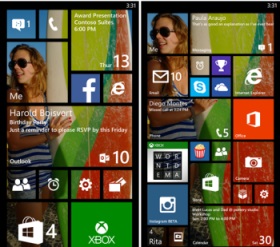
Microsoft in an attempt to offer more customisable options to Windows Phone users, has added 'Start background' feature that allows users to add an image to the tiles on the Start screen of the device.
new_start_screen_personalisation_microsoft.jpg
The feature will add an image of the user's choice to multiple tiles on the Start screen. Earlier, the Live Tiles on the Start screen on Windows Phone 8 were limited to solid colours.
In 2013, Microsoft added the third Live Tile column on the Start screen of the Nokia Lumia 1520, and then left it to manufacturer adoption. However, with the Windows Phone 8.1, the company has now added an extra column of Live Tiles on all screen sizes, with users able to choose whether to turn this feature on.
2. Cortana: Finally arrives to take on Apple's Siri and Google's Google Now
One of the highlight features of Windows Phone 8.1 is Cortana, which is Microsoft's voice-based virtual assistant. The Redmond giant's Cortana is based on a popular AI character in Microsoft's blockbuster video game franchise, Halo.
Cortana is powered by Bing and is similar to Apple's Siri or Google Now, completely replacing the search feature in WP8.1. Microsoft's Joe Belfiore claimed that the new digital assistant from Microsoft will get better with time as a user spends more time with it by asking questions to Cortana, filling up details in its Notebook section.
windows_phone_8_1_cortana_screenshot.jpg
Cortana can be launched by pressing the Live Tile placed on the Start screen or by pressing the Search button on the Windows Phone device. Belfiore said that Cortana can interact verbally or by typing, and stressed its ability to understand natural language voice commands. It can also interact with third party apps, though developers will have to build Cortana-compatibility into their apps.
Microsoft has announced that Cortana will be available first in the US as a 'beta' and later will released in the UK and China in the second half of 2014, while in other countries Cortana might reach by 2015.
windows_phone_8_1_action_centre.jpg
3. Action Centre for notifications
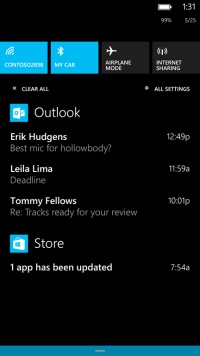
Microsoft has finally launched one of the most awaited features on Windows Phone platform, the Action Centre. The Windows Phone 8.1 update brings the Action Centre to all Windows Phone-based devices which will show notifications for calls, messages, emails, apps and others. It will also offer quick settings access to Flight Mode, Bluetooth, Wi-Fi, and Rotation Lock options. Notably, the quick access options are customisable.
The Action Centre for Windows Phone 8.1 can be accessed by a simple drop down swipe gesture like seen in Android and iOS.
4. Word Flow Keyboard
Another big addition in the Windows Phone 8.1 has been the introduction of the Word Flow Keyboard, which is a Swype keyboard-like feature for Windows Phone users. The Word Flow Keyboard allows users to glide over the display and type words.
Microsoft claims that the Word Flow Keyboard is one of the 'most intuitive smartphone keyboards' and learns from users writing style. Belfiore noted that the Word Flow Keyboard supports 16 languages, though has not named the languages supported.
Belfiore even claimed that, thanks to Word Flow Keyboard, a kid was able break the Guinness World Record for fastest writing on a smartphone earlier held by Swype keyboard on a Samsung Galaxy S4.
skype_dialler_integration_windows_phone_8_1.jpg
5. Skype Integration
Microsoft has also upgraded the Skype integration in Windows Phone devices with its latest Windows Phone 8.1. Now, the new Skype app for Windows Phone 8.1 comes with dialler integration that allows a user to switch a regular call to a Skype video call with a click of a button. Further, Skype has also been designed to work with Cortana, as users can setup Skype calls via the new voice-based virtual assistant.
6. Upgraded imaging experience
Microsoft takes the Windows Phone photography experience to the next level with the revamped Camera Roll, which gives quick access to clicked images, image tweaking tools and sharing capabilities.
The Smart Shots, Cinemagraphs, and Refocus photos options are directly accessible now from Camera Roll. Microsoft has also added the burst mode features to its Windows Phone 8.1 for clicking continuous images.
Creative Studio has been also added to the Camera Roll, which can use five new filters. The Nokia Storyteller has also received a slight addition with new video slideshow option that allows sharing via Facebook and Twitter.
7. New Sense feature for Windows Phone users
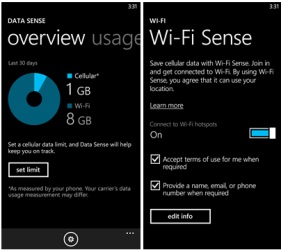
Microsoft has introduced the new Sense apps that include Data Sense, Wi-Fi Sense and Storage Sense.
sense_apps_windows_phone_8_1.jpg
Data Sense gives a detailed track of data usage on a Windows Phone, which could be braked down according to time- a month, a week etc. Data Sense includes a 'high savings' mode that the company claims will compress the images browsed on the Web, so a user can search more without with less data usage.
Another Sense app is Wi-Fi Sense, which automatically connects to a nearby Wi-Fi hotspot (when detected) to conserve cellular data.
Notably, when Wi-Fi is turned off in Wi-Fi Sense; Cortana can automatically turn it on, when a favourite location with hotspot is available.
Storage Sense can help users manage content stored on the microSD card and inbuilt storage by moving apps, music, images and videos between inbuilt storage and microSD card.
In addition, Microsoft has also improved its Battery Sense feature, giving a breakdown of apps' battery consumption, and also includes an 'automatic mode' in the Battery Saver option that can help extend battery life.
8. Slew of new delights
Apart from the major highlights of the Windows Phone 8.1, Microsoft has also added a number of minor tweaks to its OS.
nokia_lumia_630_lumia_635.jpg
After multiple leaks, the onscreen keys are official with Windows Phone 8.1. The onscreen keys for Search, Start and Back will now appear at the bottom of the display and this will mean that future Windows Phone 8.1-based devices will not feature the three capacitive buttons at the bottom of the front panel.
new_lockscreen_windows_phone8_1.jpg
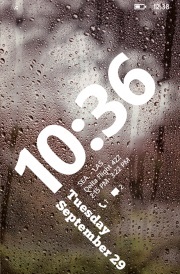
Microsoft has also introduced the new Lock Screen, which now comes with multiple Lock Screen themes featuring different visuals and animations - APIs are also available for developers to create their own themes and widgets.
The Calendar app has received a redesign and now shows a week view, along with a weather widget which has been integrated into the Calendar app. It will show at the top.
Various apps such as Music, Video and Podcasts have received improvements and are now split apps, all capable of update vie the Store.
The Internet Explorer 11 for Windows Phone 8.1 was also introduced. The new IE11 comes with new features such as InPrivate browsing, password caching, and a super-handy reading mode.

iPhone 6 Reportedly Faces Component Yield Issues; Alleged Dummy Images Leak

iphone_6_dummy_image_leak.jpg
With each passing day, new details of the unannounced iPhone 6 surface online as it seems Apple has been unable to plug all of the holes in the increasingly leaky supply chain of the company.
The latest series of image leaks show the alleged iPhone 6 sized up against the iPhone 5s in all possible angles.
iphone_6_compare_iphone5s_leak_nikkie.jpg
The leaked image corroborate what's has been widely expected based on earlier leaks, that the next iPhone will house the power button on the right panel of the device, instead on the top panel seen on current iPhone models.
Further, Nikkei has posted an image that shows the front panel of both the iPhone 5s and the yet-to-be-announced iPhone 6. The leaked image again tip that the iPhone 6 (4.7-inch variant) will feature the much-touted Apple Touch ID, which is a fingerprint sensor that debuted on the iPhone 5s and was integrated on the handset's Home button.
Another set of leaked images show the alleged 4.7-inch iPhone 6 screen glass compared to that of previous iPhone versions (iPhone 5s, iPhone 5c, iPhone 5) all sporting 4-inch display. The new leaked screen glass image of the bigger rumoured iPhone 6 model tips that the handset might be available in Black and White colours. 9to5mac claims that the availability of these parts tip that the new iPhone model is near mass-production.
"The images do not indicate any breakthrough new features for the next-generation iPhone, but the availability of these parts indicates that the new iPhone is nearing mass-production ahead of a launch this fall," said the report.
In addition, a Chinese report claims that Apple might face yield issues in an attempt to meet the thin quotient. GforGames first picked the Chinese report and notes, "Apple might've decided to use only one brightness enhancement film (BEC) in its backlit LCD display in order to save up space."
The report suggests that the Cupertino-based giant will likely face production issues as the remaining layer has to fit well.
Further, the report speculates that the components, like backlight, orders will be taken over by Omron and Radiant from Minebea, which is currently the supplier of these backlight components for the upcoming iPhone model.
The report adds that the alleged iPhone 6 mass production is expected to begin in July, while the smartphone can be released in September, in-line with earlier reports.

New App to Help Treat Smartphone Addiction

women_using_iphone_new_york_reuters.jpg
Can't put your iPhone away for long? Here comes an app that can help you de-addict from your smartphone, freeing up more time for you to spend with your family and friends.
Called Moment, the app can track how much you use your phone, and where you use it - and suggest when it might be time to put it away.
"I built Moment to help nudge me in the right direction by automatically tracking my daily iPhone use and giving me a warning when I'm on it for too long," wrote app creator Kevin Holesh on his blog post.
The iOS app automatically tracks how much you use your phone each day and if you are using your phone too much, you can set daily limits on yourself and be notified when you go over.
You can also set up reminders when you reach 50 percent of your alloted time, Daily Mail reported, citing Holesh's blog post.
"My goal was to find a balance of connected and disconnected that was right for me. Moment has helped me gain another 35 minutes every day to take my dogs for a hike or do a quick workout instead of mindlessly scrolling through Twitter," Holesh said.
"Moment is helping me find that balance," he added.

Android L: 8 New Features in the Next Major Android Release

android_l_devices_google.jpg
Android has grown from a tiny upstart to the world's dominant mobile computing platform with over a billion active users. Google isn't sitting still, though, and has just unveiled what it calls the most ambitious Android release yet. Currently known only as Android L, there's no dessert-themed codename or even formal version number yet. Android L will release later this year, though an exact date isn't known.
We hope to see new smartphones launch around the same time which take advantage of all the new features, and also updates to existing smartphones. HTC is amongst the companies committed to bringing it to its existing HTC One family, while others should announce support soon.
Here are some of the most exciting new features of Android L
google_io_innovation_google.jpg
Material design
Android will receive a complete visual overhaul aimed at promoting a consistent experience across Android device sizes and types. The new "Material Design" identity is bolder, more colourful, and more animated. Every transition between screens and every user interaction has been refined, down to the system-wide Roboto typeface and the Android navigation buttons.

The change could also be aimed at discouraging third-party vendors from developing custom Android overlays which greatly deviate from Google's vision. A strong enough core UI experience could lead users to reject anything seen as inferior to it.Screen elements will be able to simulate depth, with automatic shadows and scaling, but will also inherit elements of classic magazine typography and layout. There's more emphasis on simple shapes and consistent actions that lead you from one app into another. Google's new design page offers hints of what is to come.
The Material Design identity integrates elements of responsive Web design and will extend to other Google properties including Gmail, which will be redesigned for the Web as well as mobile apps. Material Design takes into account the fact that touch, voice, mouse and keyboard are all equally important input methods, clearly illustrating goals above and beyond smartphone usage scenarios.
google_io_desgin_google.jpg
Improved notifications
You will be able to interact with notifications more easily in Android L. For starters, you can choose which ones show up on the lock screen and what amount of detail they'll show. You can decide whether snippets of actual messages are displayed when your phone is potentially visible to others, or whether more details will only be revealed when you unlock it. They also aren't necessarily displayed in chronological order anymore - the OS can learn which ones you're more likely to respond to urgently and prioritise those.
There's also a new type of notification altogether - Google calls these heads ups. These appear on top of whatever you're doing and allow you to take action or dismiss them immediately. These are meant to be less intrusive, and can be used for things that can't wait, such as incoming calls.
Trusted environments
Speaking of the lock screen, you'll soon be able to have your phone detect when it's in a trusted environment, which will dispense with the lock code. This could be triggered by the presence of a Bluetooth device such a smartwatch that you wear all the time, a specific Wi-Fi access point, or other factors. When the environment is deemed safe, you won't have to bother with unlocking your phone.
android_l_notifications_google.jpg
Project Volta, battery improvements
Android L will be able to manage battery life much better, but Google's moves go beyond that to the app development stage, for which new tools have been developed that let developers track battery drain and optimise apps before they ever reach end users. The battery saver mode is similar to those implemented by third parties so far - non-essential services can be turned off or made to run only at intervals in order to save power. Android L will also be able to lower the screen refresh rate, reduce the frequency of data exchanges, or force apps to change their behaviour to match the prevailing battery state.
Google Fit
Everyone's getting into health and activity tracking, and Google is no exception. The new Google Fit framework will take Apple's Healthkit head on, tying into sensors on phones themselves as well as connected accessories to collect data which will be ready for apps to use. Major partners including Nike, Adidas, Runkeeper, HTC, Asus, LG and Motorola are already on board. Google Fit could monitor physical activity and food intake as well as health indicators such as heart rate and breathing.
Greater Web integration
There's also a change to the way individual tabs and documents in apps are handled by Android L. They'll now show up as individual entries in the Recents menu, allowing users to jump directly between them. This pulls the focus away from apps and puts it onto all the things you do with them. For example, Web apps open in Chrome tabs would appear much like native apps running on your device, and you'd be able to jump in and out of them more quickly.
google_io_web_google.jpg
Links on the Web can now also be used to launch apps instead of websites (presumably falling back to the website in case the app is not installed). For example, Google demonstrated looking up a restaurant in Chrome and then tapping a link to not only launch the OpenTable app, but also have it know that it should bring up that restaurant's booking page. Google search results can also now be links that trigger an app, rather than links to websites.
ART Runtime and Android Extension Pack
Google is ditching the Dalvik runtime which has served well for years, in favour of a new one called ART. It can make apps load and run quite a bit faster while using less RAM. ART is 64-bit compatible, and is also engineered to allow apps to work across hardware architectures such as ARM and X86. This also means that Android devices will be able to address more RAM than the 32-bit limit allowed.
With greater diversity in Android hardware obviously envisioned for the near future, the move is a welcome change. Google has worked with major hardware vendors to enable more fluid graphics, potentially paving the way for new Android-based game consoles and set-top boxes. Desktop-class graphics including tessellation, geometry shaders and texture compression will potentially be possible on Android devices.
google_io_recents_google.jpg
Knox
Google also made a few announcements that indicate interesting things on the horizon for enterprise users. The company announced that Samsung's Knox feature for work and personal separation will become a part of Android itself. Knox allows corporate IT administrators to control work-related data and policies on employees' smartphones while letting the employees themselves continue to store personal data and use unrelated apps. This alleviates many of the problems with accessing secure information from mobile devices and could make Android far more attractive to businesses.