Sunday, February 02, 2014

FindIt - Email and File Search

A little over two months after FindIt first launched for iPhone, the email- and file-search app quietly rolled out on Android too.
FindIt is the easiest way to find and share emails and files across the cloud using your phone!
Search in a visual way using people, timing, and file types. Search multiple Gmail, Google Drive, and Dropbox accounts at the same time!
Finally there is a better way to search on your phone! Use the beautiful FindIt visual filters to quickly find what you need. Just select a person, time period, or type of file to narrow the results and find the file or email you are looking for no matter where it is across Gmail, Google Drive, or Dropbox.
• Stop feeling frustrated searching for emails and files on your phone
• Find files from Gmail, Google Drive, & Dropbox with a single search
• No more waiting while your phone searches through archived emails on the server
• Feel confident you can find what you need when you need it
• Share what you find with just a swip

Rating: 4.1/10

                                        Download free FINDIT app for adnroid...


Thursday, January 30, 2014

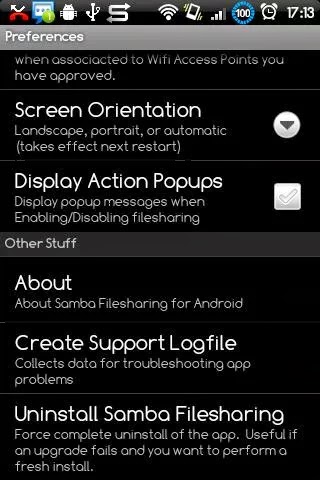
Samba Filesharing for Android

Access your Android device over wifi as a Windows shared folder.
* Samba Filesharing server for Android.
* Your Android device becomes visible to other Windows (& SMB compatible) computers on your network.
* The 'external' storage in your Android device is accessible as a network shared folder.
* Copy files and folders to and from your Android device using drag and drop.
* Customisable username, password, Windows workgroup name, and device network (NETBIOS) name.
Requirements:
*** Current version works OK up to Android ICS / 4.0.x, Am looking into a new release to address the app probs experienced by users of Android 4.1+ / Jelly Bean devices.
* Your Android device must already be rooted.
* Superuser 2.3.6.2 or later installed (available on Market).

Ratings: 4.3/10


Tuesday, January 28, 2014

AirDroid - Best Device Manage

Your Android, on the Web
AirDroid is a free and fast app that helps you manage your Android from a desk web browser, all over the air.

AirDroid philosophy:
※ One less cable.
Move things on and off your Android device without a USB cable. Even when the device is not nearby.
※ One less screen.
Send and receive SMS from your big-screen computer, without being distracted by the small-screen thing.
※ One less worry.
Locate and lock your Android when it’s lost. Cannot get it back? Simply wipe all data remotely.
Media coverage:
※ “This app allows you to take complete control of your Android device via your computer's Web browser.” - PCWorld
※ “I'm sending text SMS messages from my Android phone via my browser. I can't stress how great that is.” - Gizmodo
※ “It's a remarkably comprehensive app, operates securely, and is a free download.” - Lifehacker
※ “It's all the little things, the things that make AirDroid a joy to use, which make it the app of the year.” - Android Police
Key features:
※ Desktop SMS
Send & receive SMS from the comfort of your computer. Faster typing and navigation with the full keyboard and large screen.
※ Files and Media
Move photos, videos, ringtones and any other files on and off Android, all without a USB cable.
※ Find Phone
Locate and lock your Android when it’s lost. Cannot get it back? Simply wipe all data remotely.
※ Manage Apps
Easier way of app search, installation and apk export.
※ Camera and Screenshot
See through the lens of your Android camera, front and back. Or stream the screen of your Android in nearly real-time.

Ratings: 4.7/10


Loopr - Task Switcher

Do you want to speed up your multitasking? Being able to customize your device with a new look? Then this app might be the right one for you.
Loopr is a task switcher, pretty much like the recent apps menu on your android system, but with much quicker access and a few more options.
Features:
- Display open apps by tapping the edge;
- Change color style of the app;
- Change applications transition effect;
- Choose the trigger sides and area;
- Pin Back and Home buttons;
- Halo floating windows support (Supported rom's only);
- Live Preview, allows you to quick peek the running apps (iap);
- Icon Pack's support, to keep your phone's look (iap);

Rating: 4.0/10


DynamicNotifications

DynamicNotifications allows you to receive important notifications when your screen is off. When you miss a call or receive a new email/SMS, the display will discreetly light up to let you know, without needing to unlock the device. Most phones only have a pulsing notification LED that doesn't actually tell you anything about the incoming notification - with DynamicNotifications, you can immediately decide if something is important enough to act.

FEATURES:
* Notifications don't light up when your phone is in your pocket, purse, or face down to avoid accidental unlocks
* Select which app-notifications you'd like to receive via DynamicNotifications
* Change the appearance of the app (custom foreground/background color/image, show the date near the clock, change the main notification border style, and more)
* "Custom timeout": Select for how long DynamicNotifications should be shown (Premium feature)
* "Breathing notifications": Let not yet dismissed notifications reappear after custom intervals (Premium feature)
* "Night mode": Don't show notifications at night (Premium feature)
* "Hide additional details": Hide additional notification details (e.g. SMS text, sender) (Premium feature)
* "Use as lockscreen": Use the app as a replacement for your stock lockscreen (Premium feature)
* "Auto-wake": Automatically turn on the screen when you pull the device out of your pocket or pick it up from lying face-down (!) on a table (Premium feature)
* "Custom brightness": Select how bright the DynamicNotifications screen should be (Premium feature)
* "Edit swipe actions": Choose the action (e.g. unlock, dismiss, launch camera/custom app) for each swipe direction(Premium feature)


Rating: 4.1/10

Free Download Google DynamicNotifications for Android